Latest Enhancements
Publish Schedule
We are happy to share we have added a new feature that will allow you to set a ‘published through date’ for your schedule. This will allow you to keep future dates hidden while the schedule is still being developed.
The new feature is very easy to use:
- Select Publish Schedule within the Schedule menu
- Set Published Through date to the date through which you want the schedule to be visible to basic users (administrators can see the schedule beyond the published through date)
- All users will see this type of note on the dashboard in the My Schedule window: Schedule is published through 5/12/2023.
- Basic users will also see this type of note when they are in the schedule and navigate beyond the published through date
- Ongoing, administrators can update the Published Through date with new dates as schedules are completed, or clear the Published Through date to open all dates to basic users’ views
Monthly Schedule View Updates
As shared previously, you can now edit shifts in the Monthly Schedule View. You can see open shifts, and edit the schedule just as you can in the Hourly, Daily and Weekly views. You can add and remove someone from a shift, update shift times and notes, message members of an open shift, and move someone from one shift to another, all from the Monthly view!
For those of you who would prefer not to see open shifts in the Monthly view, you now have the option to hide open shifts in the Monthly view. Simply go into your Schedule Preferences, where you can choose to either show or hide Open Shifts on Monthly.
Audit Trail
We now offer an audit trail that will give you information on changes made to user profiles and timecards.
You will see a ‘View Audit’ button at the bottom righthand side of the Administrator Clock In/Out and User Profile screens. After clicking on the button, you will see rows of data for any updates that have been made. You can click in to each row to expand the row and view the detail of the update or change that was made.
If you would like the audit trail enabled for your organization, please email us at support@goeschedule.com
Vehicle Mileage Log
The Vehicle Mileage Log now shows a column with the VIN. The VIN also now shows next to the Vehicle’s name when making updates to the mileage on the Enter Mileage screen
Absentee and Late Report
The Absentee/Late Report now includes a Pay Type column. Pay Types can also be hidden by using the drop down filter (to the right of the search field) and checking the Hide Pay Types checkbox.
Chrome Extension
We fixed an authentication issue with the Chrome Extension used to authorize Time Clock PC’s.
Mobile App Update
We have made a few updates to the mobile app to address issues with bidding on shifts that cross midnight, and the app closing unexpectedly on Android devices.
We are also working on correcting standby shifts to ensure they only display as open when they are opened by an administrator and not yet filled.
Last, we are hard at work developing the “2.0 and beyond” versions of the app, which will include additional scheduling and messaging functionality, clock in/out, time off requests and timecard view.
Upcoming Enhancement
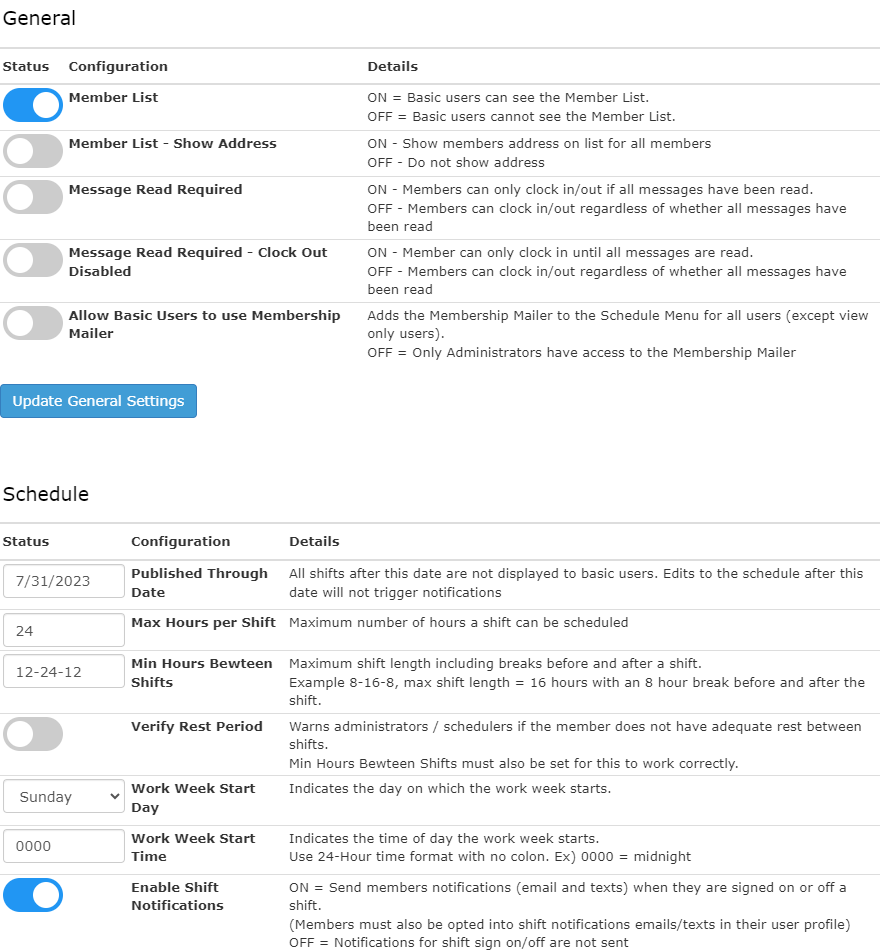
We have been hard at work developing a new self-administration account configuration tool, which will allow administrators to make configuration changes for general, schedule and time clock settings.
See below for a sneak peek of this soon-to-be-released self-admin tool!